
%ENGINE%
On-device scan engine
A ping / TCP-connect sweep primes the ARP cache, then reads MAC, vendor, name, type and OS — merged into one device record.
The mobile edition of My Network Scanner runs the complete scanning engine on-device — there is no server to run, no Docker, no pairing. It discovers, identifies and monitors every device on your home network, with the same look and feel as the web app.
My Network Scanner'ın mobil sürümü, tüm tarama motorunu cihaz üzerinde çalıştırır — çalıştırılacak sunucu yok, Docker yok, eşleştirme yok. Ev ağınızdaki her cihazı keşfeder, tanımlar ve izler; web uygulamasıyla aynı görünüm ve his.
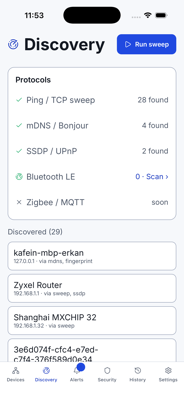
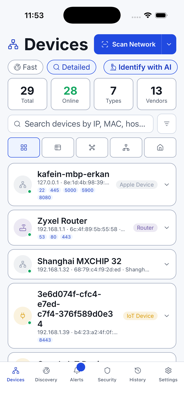
The web app is brilliant on a home server. But sometimes you just want to open your phone, tap scan, and see what's on the Wi-Fi you're standing in. MyNeS Mobile does exactly that — the full engine, offline, in your hand.
Web uygulaması bir ev sunucusunda harikadır. Ama bazen sadece telefonunuzu açıp taramaya dokunmak ve içinde bulunduğunuz Wi-Fi'de ne olduğunu görmek istersiniz. MyNeS Mobile tam da bunu yapar — tüm motor, çevrimdışı, elinizde.
A ping / TCP-connect sweep primes the ARP cache, then reads MAC, vendor, name, type and OS — merged into one device record.
The bundled native module reads the kernel ARP/NDP cache after the sweep, so reachable hosts yield a MAC on stock Android and iOS.
The IEEE OUI table ships inside the app — vendor names resolve with no network round-trip once a MAC is known.
Reverse-DNS first, then mDNS/Bonjour, SSDP/UPnP and NetBIOS, falling back to an HTTP title or banner-derived guess.
Port-based classification refined by a banner-grab pass (HTTP/SSH/FTP/RTSP) that only probes ports already found open.
Design tokens and icons are generated from the web app's design system, so the two clients look and feel identical.
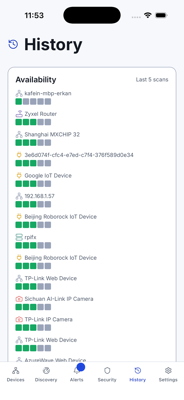
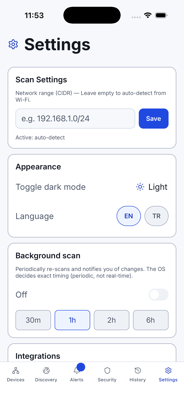
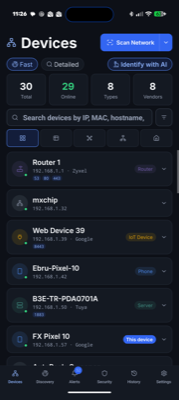
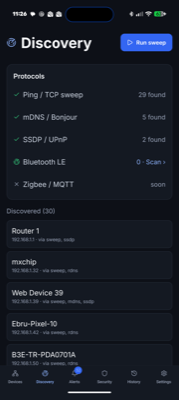
Captured while scanning a live home network — devices, discovery, alerts, security, history and settings.
Canlı bir ev ağı taranırken çekildi — cihazlar, keşif, uyarılar, güvenlik, geçmiş ve ayarlar.
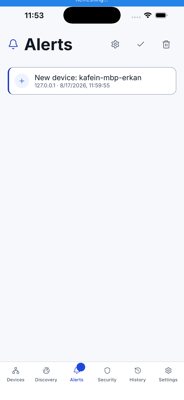
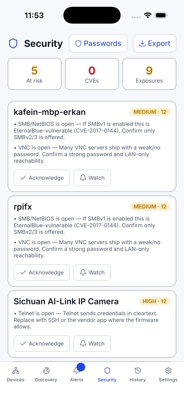
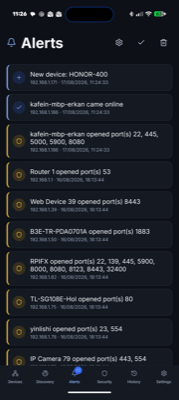
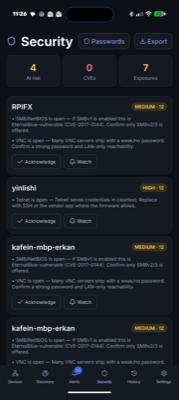
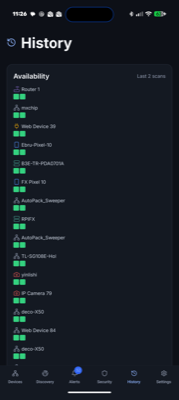
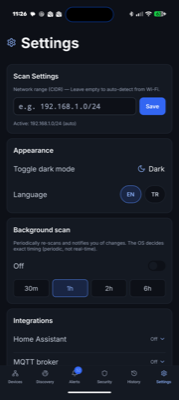
Install it from Google Play or the App Store and open it on your phone — no account, no setup, no pairing.
The app detects the Wi-Fi subnet you're on and sweeps it on-device, priming the ARP cache as it goes.
Each host resolves to MAC, vendor, name, type and OS. Rename, tag and organise exactly like the web app.
Re-scan any time to catch new devices, changed IPs and open ports, with alerts and history built in.
Free and MIT-licensed, like everything MyNeS. Get it on Google Play or the App Store — or explore the full scanner on the web.
Tıpkı MyNeS'in geri kalanı gibi ücretsiz ve MIT lisanslı. Google Play veya App Store'dan indirin ya da tarayıcının tamamını web'de keşfedin.